Click to play video

Tutorial with Source Code
Please Register for FREE account or Login to purchase this source code.
By downloading, you agree with our Terms & Conditions
The Liquidity Ladder Zones is a sophisticated drawing tool developed for NinjaTrader 8 and 8.1. It specialises in identifying layered liquidity accumulation areas by scanning price action for repeated wick interactions at specific levels, automatically building probability-ranked zones that reveal where price has historically reacted multiple times and where future reactions are statistically likely, providing traders with clear, structured liquidity frameworks rather than subjective single-line support and resistance placement. When you purchase the Liquidity Ladder Zones from Rize Capital, you receive the complete NinjaScript source code, providing total freedom to modify the detection algorithms, customise the probability calculation methodology and visual appearance parameters, or integrate the liquidity zone logic into your own trading frameworks with no restrictions whatsoever. For a detailed overview, check out our video tutorial above.
See how the Liquidity Ladder Zones - NinjaTrader 8 Drawing Tool looks in action with these screenshots
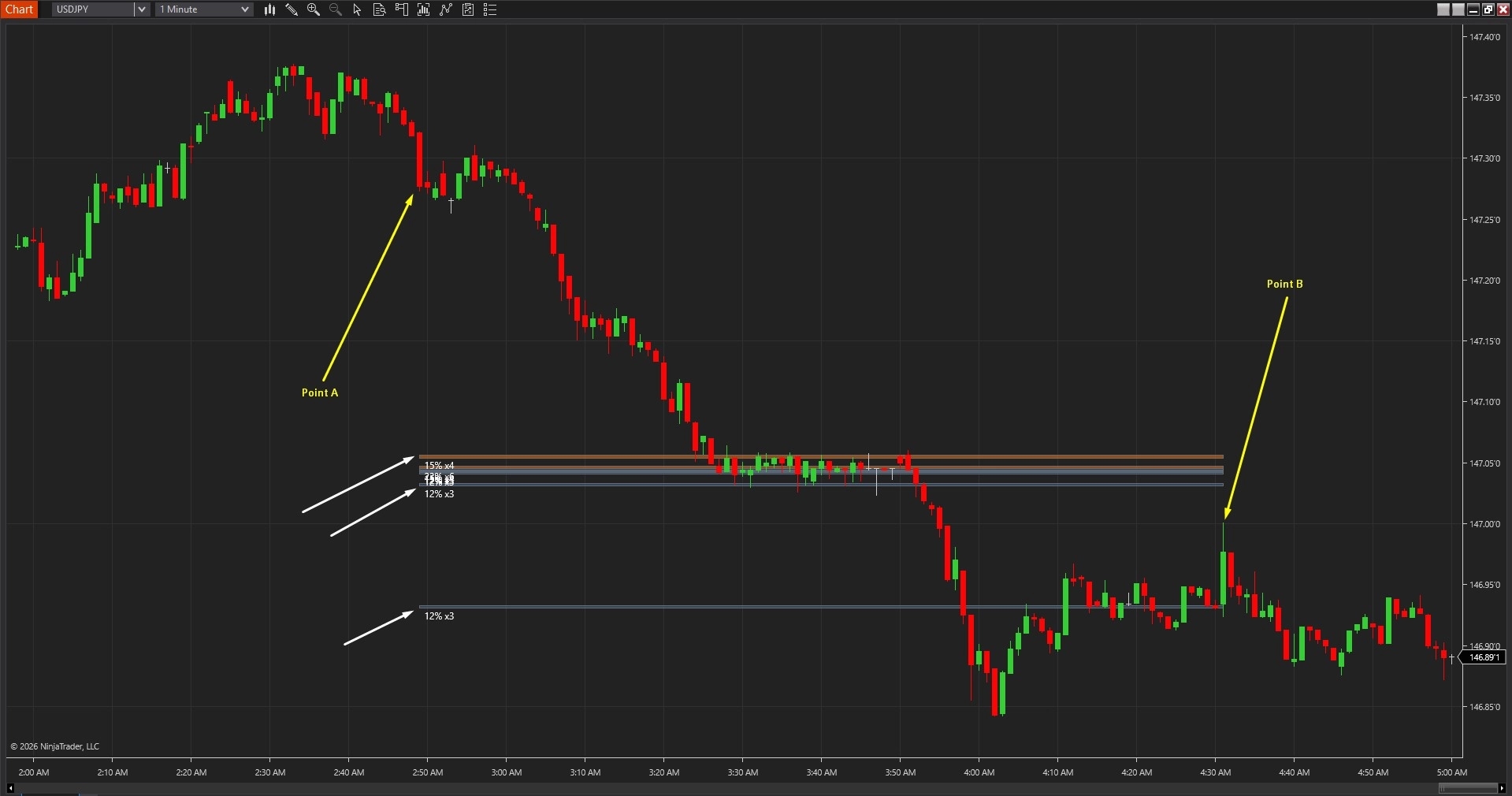
Learn how to use the Liquidity Ladder Zones - NinjaTrader 8 Drawing Tool
The Liquidity Ladder Zones Drawing Tool for NinjaTrader 8 specialises in systematic liquidity accumulation detection by analysing how price wicks interact at specific levels across historical price action, automatically identifying areas where repeated wick touches indicate liquidity concentration and calculating probability rankings based on interaction frequency. The core functionality revolves around multi-layered zone construction combined with probability-weighted visualisation that transforms raw price movement into structured, hierarchical liquidity frameworks showing where market participants have consistently placed orders.
As shown in Image 1 (pointed by yellow arrows), traders place Anchor A and Anchor B to define the analysis window—the tool scans price action between these anchors to identify liquidity accumulation patterns. If anchors are not manually placed, the tool automatically analyses recent price history based on the Lookback Bars parameter. Once analysis completes, horizontal bands appear on the chart (pointed by white arrows) representing detected liquidity zones. Each zone marks a price level where wicks repeatedly touched, indicating multiple instances of buyers or sellers stepping in at that specific area.
The tool goes beyond simple level identification by incorporating probability ranking that quantifies liquidity strength. Zones above current price appear as resistance areas—levels where selling pressure has historically emerged and where upward price advances may encounter supply. Zones below current price (pointed by yellow arrows) represent support areas—levels where buying interest has previously materialised and where downward moves may find demand. The layered presentation creates a "ladder" effect showing multiple tiers of liquidity rather than single arbitrary lines.
The visual framework includes probability labelling when Show Probabilities is enabled. Each zone displays a percentage value representing interaction frequency—higher probability zones (e.g., 85%, 90%) indicate levels where price reacted most consistently across the analysis window, suggesting stronger liquidity concentration. Lower probability zones (e.g., 45%, 55%) mark less-tested levels with fewer historical interactions. This quantitative approach eliminates subjective assessment of which levels "matter most," providing data-driven hierarchy for trade planning.
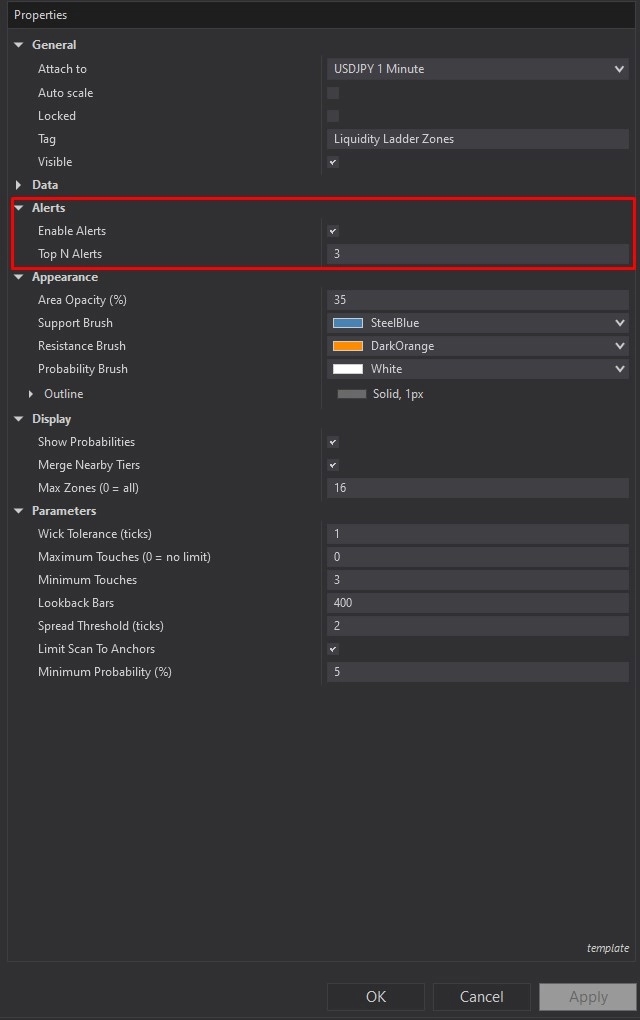
Liquidity Ladder Zones offers comprehensive customisation through its settings panel. The Alerts section, highlighted by a red rectangle in Image 2, controls notification functionality. The Enable Alerts parameter activates audible and visual alerts when price reaches identified liquidity zones, helping traders monitor multiple instruments without constant chart watching. The Top End Alerts setting, when enabled, restricts notifications to only the highest-probability zones—this filtering prevents alert fatigue by notifying traders only when price approaches the most significant liquidity areas with strongest historical interaction patterns.
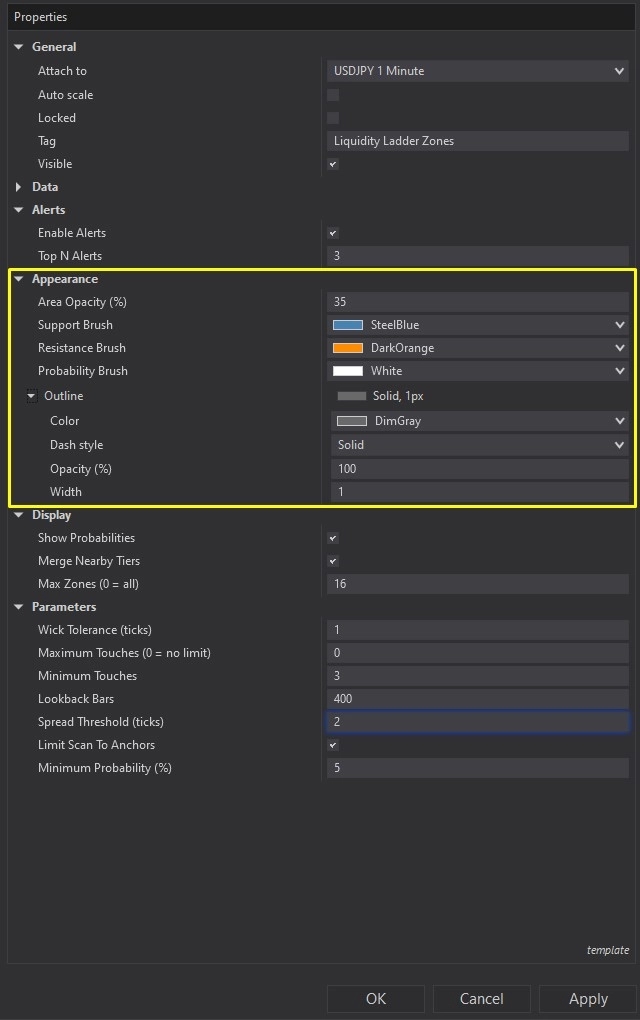
Image 3 displays the Appearance configuration options, highlighted by a yellow rectangle. The Area Opacity parameter controls zone fill transparency—lower opacity values create subtle overlays that maintain price action visibility whilst still marking liquidity areas, higher values produce prominent zones for increased visual emphasis. The Support Brush setting determines the colour scheme for liquidity zones below price, conventionally using bullish colours (greens, blues) to represent demand-side liquidity accumulation. The Resistance Brush controls colouring for zones above price, typically employing bearish colours (reds, oranges) to signal supply-side liquidity.
The Probability Brush parameter sets the text colour for probability percentage labels displayed on each zone, ensuring readability against various chart backgrounds and zone colours. The Outline setting enables border styling for zone boundaries, including colour, thickness, and line pattern options—solid outlines provide clear zone demarcation, whilst dashed patterns create more subtle visual separation without overwhelming price action visibility.
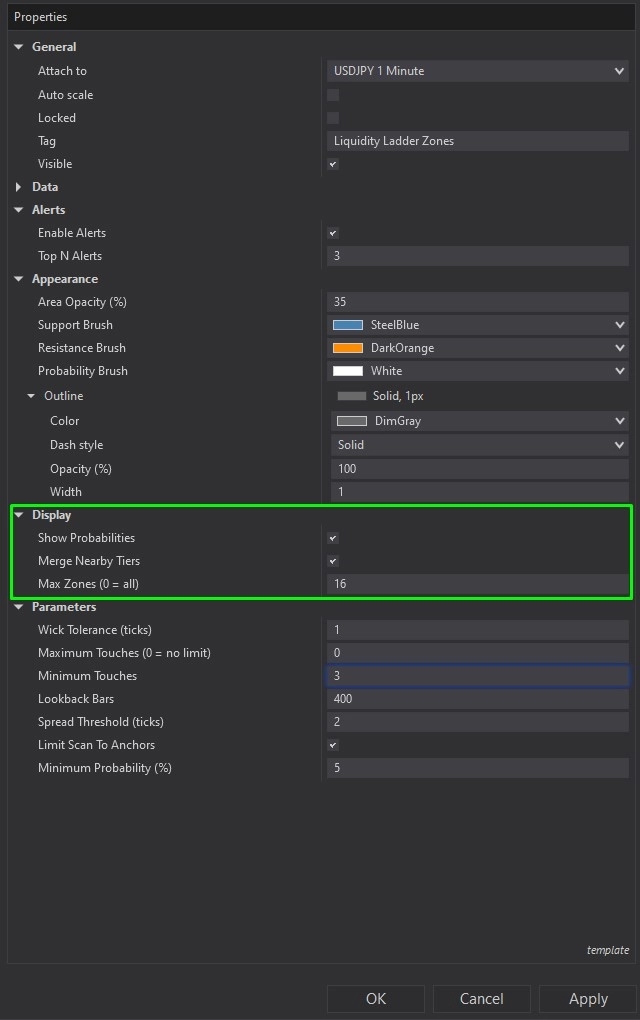
The Display section, illustrated in Image 4 (highlighted by a green rectangle), controls information presentation and visual organisation. The Show Probabilities toggle determines whether percentage values appear on each zone—enabling this displays the quantitative foundation for liquidity strength assessment, whilst disabling it creates cleaner charts when traders already understand relative zone importance through visual hierarchy.
The Merge Nearby Tiers parameter, when enabled, combines liquidity levels that fall within close proximity into single consolidated zones, reducing visual clutter on charts where multiple levels cluster tightly. This merging functionality particularly benefits lower timeframe analysis where frequent wick touches may create numerous near-identical levels that are more effectively represented as unified zones. The Max Zones setting establishes a ceiling on how many liquidity zones display simultaneously—setting this to zero shows all detected zones, whilst specific values (e.g., 5, 10, 15) limit display to only the highest-probability areas, focusing attention on the most significant liquidity tiers.
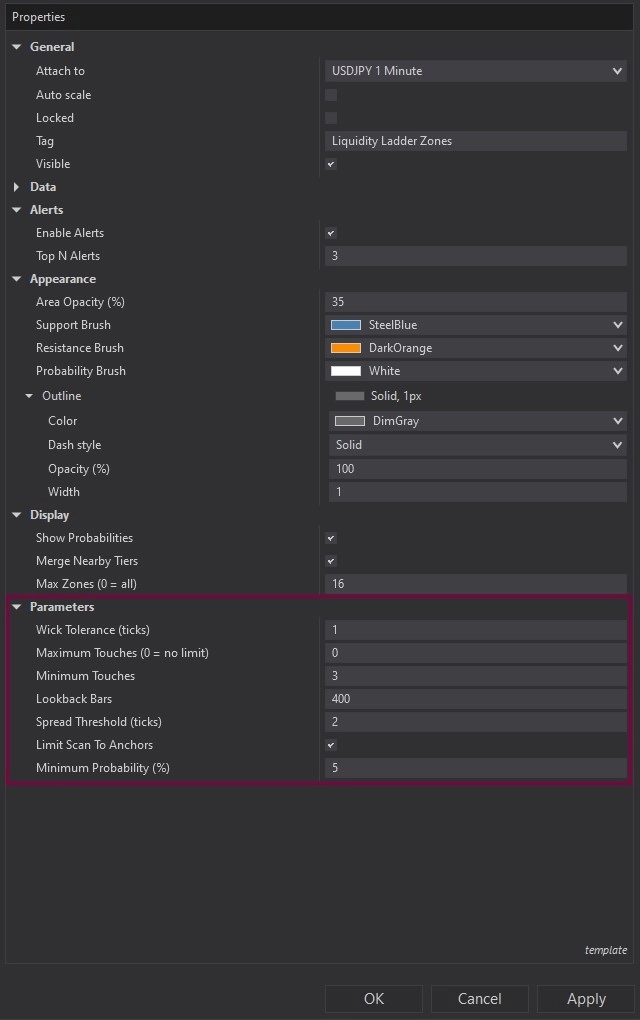
Image 5 (highlighted by a purple rectangle) reveals the Parameters section. The Wick Tolerance parameter defines how close wick prices must be (in ticks) to be considered interactions with the same liquidity level—lower tolerance values require tighter clustering creating more discrete zones, higher tolerance allows broader grouping consolidating nearby touches into single zones. This setting critically affects zone granularity and should be adjusted based on instrument tick size and typical price movement characteristics.
The Maximum Touches parameter limits zones that have been tested excessively—when set to a specific value (e.g., 10), zones touched more than that number of times are filtered from display under the assumption that heavily tested levels may have depleted their liquidity. Setting this to zero removes the limitation, showing all zones regardless of touch count. The Minimum Touches setting establishes the validation threshold—zones require at least this many wick interactions to qualify as legitimate liquidity areas, filtering out single-touch anomalies that don't represent consistent accumulation patterns.
The Lookback Bars parameter determines the historical depth of price action analysis—higher values scan more extensive history providing comprehensive liquidity mapping but increasing computational load, lower values focus on recent behaviour with faster processing. Traders should balance historical context needs against performance considerations based on their analysis requirements.
The Spread Threshold setting limits maximum zone width (in ticks), preventing the tool from creating unrealistically wide zones during volatile periods where wick clustering becomes dispersed. This ensures zones remain actionable price levels rather than broad ranges that lack precision for entry and exit planning. The Limit Scan to Anchors toggle, when enabled, restricts analysis exclusively to the area between manually placed Anchor A and Anchor B, allowing focused examination of specific chart sections. When disabled, the tool analyses the full lookback period regardless of anchor positioning.
The Minimum Probability parameter filters display to show only zones meeting a specified confidence threshold—setting this to 60% hides all zones with lower interaction frequencies, ensuring only well-established liquidity areas appear on charts. This filtering helps traders focus attention on the highest-conviction levels rather than tentative accumulation zones that may not provide reliable reaction points.
With full NinjaScript source code included, advanced users can modify the wick interaction detection algorithms to incorporate additional criteria beyond simple touch counting (e.g., weighting recent touches more heavily), adjust the probability calculation methodology to implement alternative statistical models or confidence intervals, alter the zone merging logic to create custom clustering rules based on ATR percentages or fixed tick distances, integrate volume analysis to weight zones where high-volume wicks occurred more significantly, create automated alert systems that distinguish between first touches and retests of zones, or build sophisticated strategy frameworks that automatically adjust position sizing based on zone probability rankings without restrictions.
If you have questions about Liquidity Ladder Zones, refer to the comprehensive video tutorial above.
Secure payment via PayPal
By downloading, you agree with our Terms & Conditions