Click to play video

Tutorial with Source Code
Please Register for FREE account or Login to purchase this source code.
By downloading, you agree with our Terms & Conditions
Swing Cycle Timer is a reversal timing indicator created for NinjaTrader 8 and 8.1. It helps traders recognise when a market swing may be reaching exhaustion and a reversal could be developing. The indicator measures how mature the current swing move is based on the rhythm of previous market swings, waits for actual price confirmation before signalling (not blindly calling tops or bottoms), and immediately maps stop zones plus projected reward targets when signals appear—giving you instant visibility into whether the setup offers realistic risk-to-reward. When you purchase Swing Cycle Timer from Rize Capital, you get the complete NinjaScript source code included. This means you're not buying a locked tool—you own code you can open, study, modify, and integrate into your own strategies without any restrictions. For a detailed walkthrough, watch our video tutorial above.
See how the Swing Cycle Timer - NinjaTrader 8 Indicator looks in action with these screenshots
Learn how to use the Swing Cycle Timer - NinjaTrader 8 Indicator
Swing Cycle Timer for NinjaTrader 8 addresses a common trading challenge: knowing when a move has gone "far enough" to consider reversal entries. Most traders struggle with this. Enter too early and the trend keeps running against you. Wait too long and you miss the reversal entirely. This indicator helps by measuring swing maturity—how long the current move has been developing compared to previous swing cycles—then waiting for price confirmation before signalling.
The tool works in three stages. First, it tracks confirmed swing pivots to understand the market's natural rhythm. Second, it calculates how "old" the current swing is relative to past cycles, building a reversal pressure score. Third, when that pressure score reaches the trigger level and price shows actual confirmation of momentum shift, a signal appears. At that exact moment, the indicator draws your stop zone and projected profit targets directly on the chart.
This immediate risk-reward framing is crucial. You don't just get "buy here" or "sell here"—you see the complete trade structure instantly. Is the stop 10 ticks away with a 20-tick target? That's 2:1 reward-to-risk, potentially worth taking. Is the stop 15 ticks away with only a 12-tick target? That's less than 1:1, probably not worth the trade. You make this assessment in seconds rather than manually measuring distances.
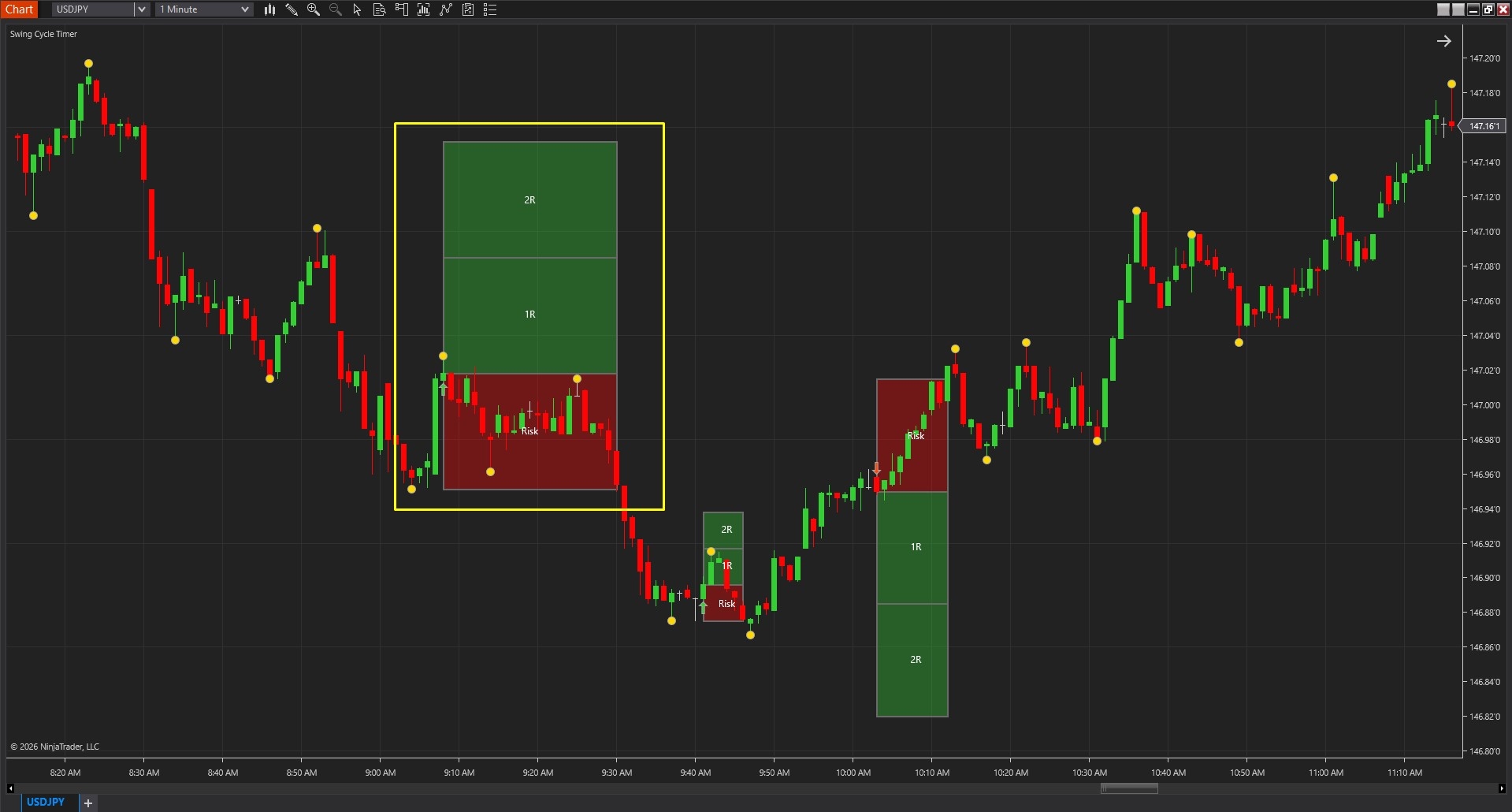
Image 1 (marked with a yellow rectangle) displays a bullish reversal signal appearing on the chart. Notice the upward-pointing arrow marking the entry point. Below the entry, you'll see the stop zone drawn automatically—this shows exactly where your protective stop should go based on swing structure. Above the entry, the indicator projects reward target levels based on your configured reward multiple.
This visual layout means you're not guessing about trade mechanics. The moment the signal prints, you know your entry point (the arrow), your invalidation point (the stop zone), and your profit objectives (the target projections). You can immediately decide whether this trade fits your risk management rules.
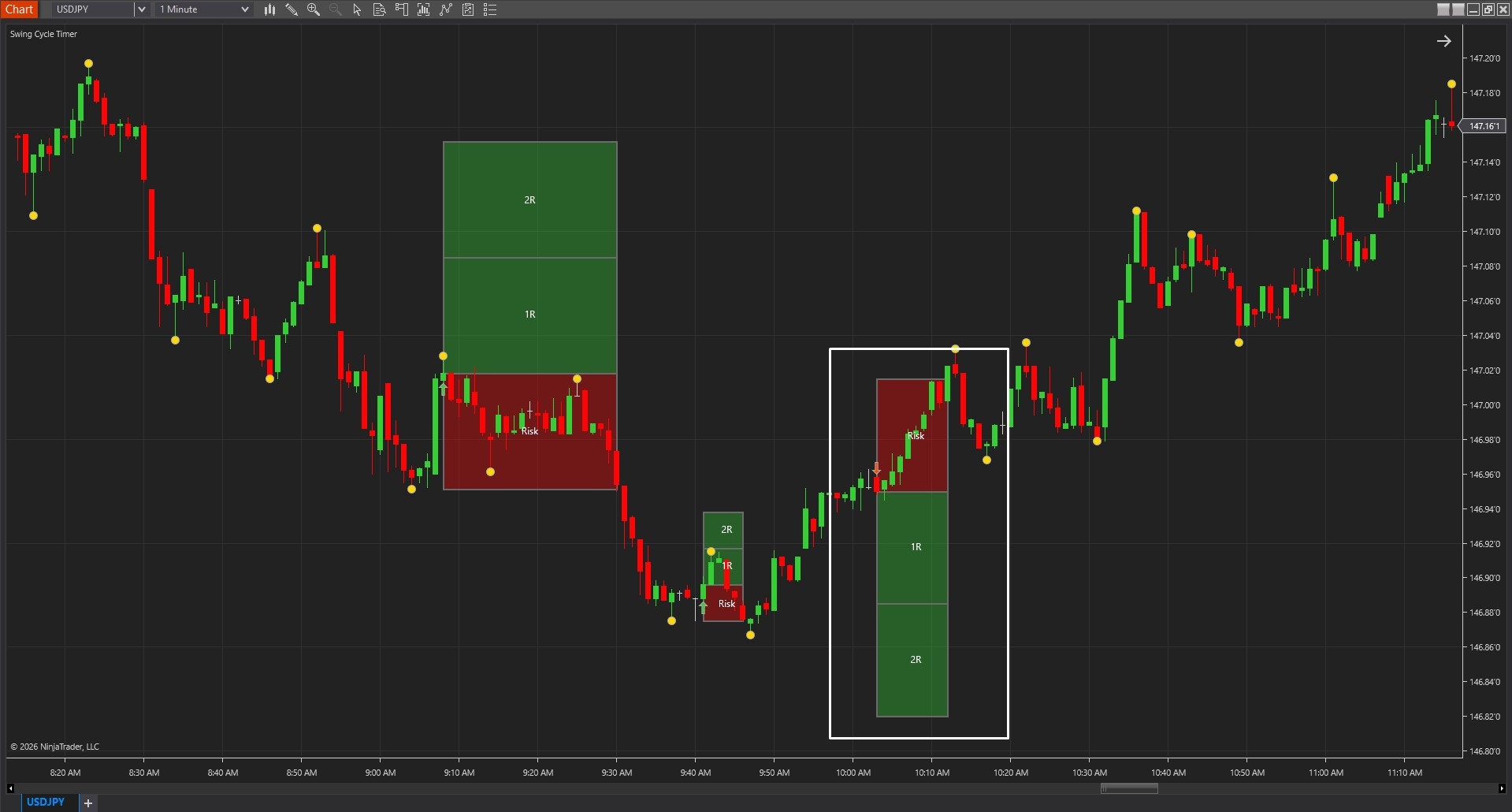
Image 2 (marked with a white rectangle) shows the opposite scenario—a bearish reversal signal indicated by a downward-pointing arrow. Above the entry, the stop zone appears automatically. Below the entry, the projected targets display based on the reward multiple setting.
Again, everything you need to evaluate the trade appears instantly. If you're scanning multiple charts looking for reversal opportunities, you can quickly assess each signal's quality by checking whether the reward zone makes sense relative to the risk zone.
The indicator tracks confirmed swing pivots in the background. These pivot points—marked subtly on the chart—help the indicator understand market rhythm. By measuring the time and distance between previous pivots, the tool builds a statistical model of typical swing duration.
When the current swing extends beyond typical duration, reversal pressure builds. But the indicator doesn't signal yet—it waits for price confirmation that momentum is actually shifting, not just pausing temporarily.
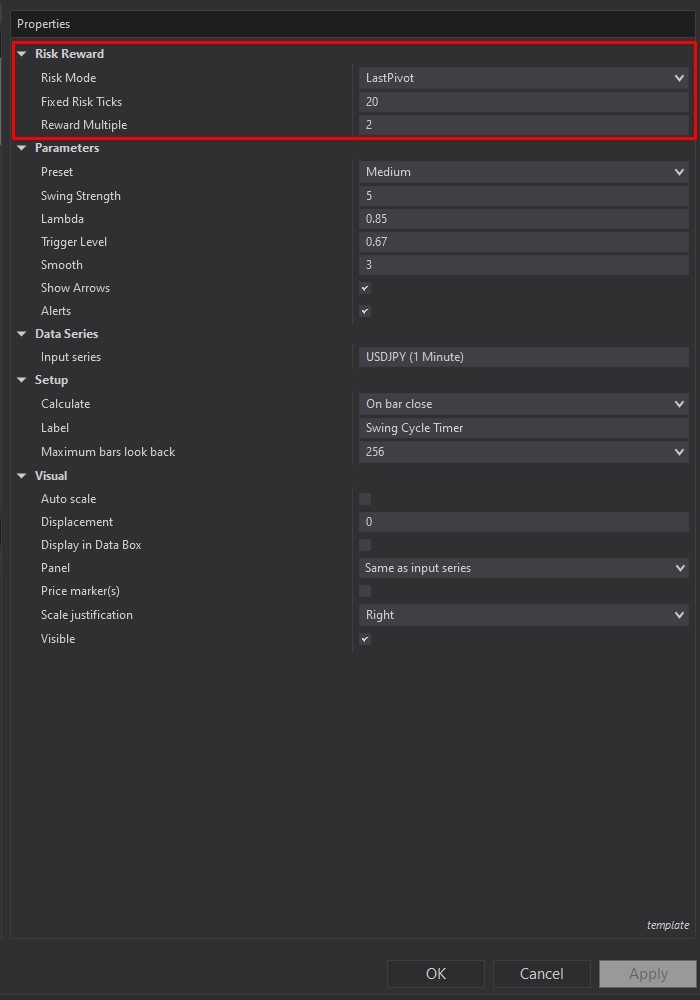
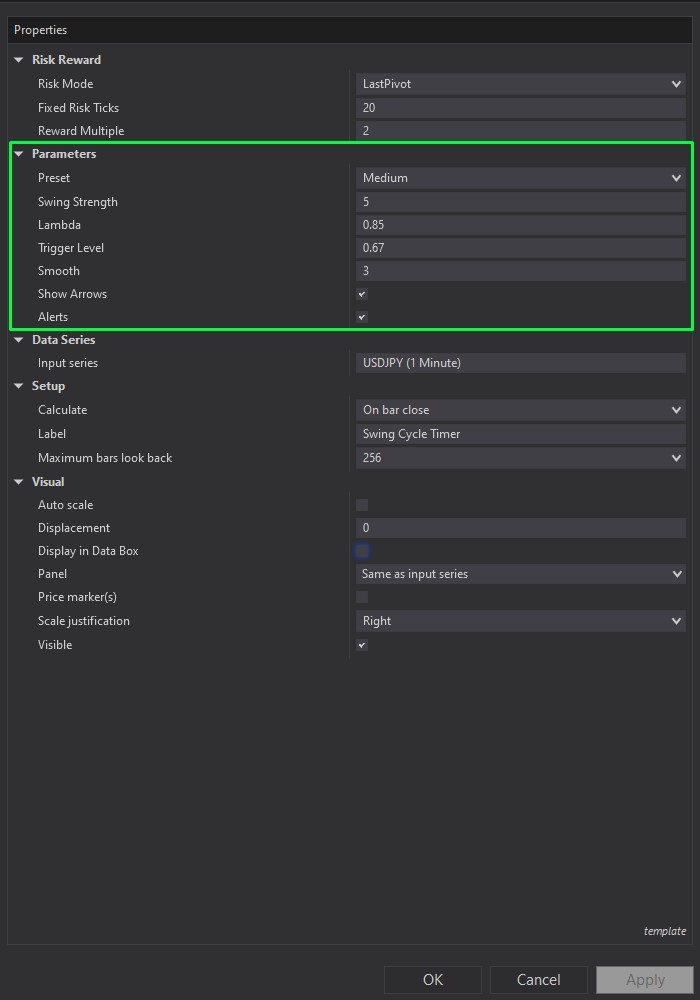
Image 3 (highlighted by the red box) shows the Risk Reward configuration section. The "Risk Mode" parameter lets you choose between two stop placement methods. "Last Pivot" mode places stops based on actual swing structure—beyond the most relevant pivot point. This adapts to real market geometry rather than arbitrary distances.
Alternatively, "Fixed Ticks" mode places stops a defined number of ticks from the entry. This creates consistent risk sizes across all trades, which some traders prefer for position sizing calculations.
The "Fixed Risk Ticks" setting (only active when using Fixed Ticks mode) defines exactly how far away the stop sits. The "Reward Multiple" parameter determines target projection—set to 2.0, and targets extend twice as far as the stop distance. Set to 1.5, and targets are 1.5 times the risk. This makes risk-reward assessment instant and visual.
Image 4 (marked by the green box) contains the Parameters controls. The "Preset" dropdown offers quick sensitivity switching. "Short" presets react faster to smaller swings—useful for scalping or very active markets. "Long" presets focus on broader swing structure—better for swing trading approaches. "Medium" provides a balanced middle ground that works for most traders.
"Swing Strength" controls pivot confirmation strictness. Higher values require stronger price movement before confirming a pivot, producing fewer but more significant swing points. Lower values create more pivots, making the indicator more sensitive to minor swings.
"Lambda" controls how quickly reversal urgency builds as the swing ages. Think of this as patience control. Lower lambda values make the indicator respond faster—reversal pressure accumulates quickly. Higher values make it more patient—reversal pressure builds slowly, waiting for more extreme swing maturity.
"Trigger Level" sets the threshold that reversal pressure must exceed before a signal can appear. Raising this value filters signals, keeping only the most mature swings. Lowering it allows earlier signals from less-mature swings.
"Smooth" reduces calculation noise. Higher smoothing produces steadier, more stable reversal pressure readings. Lower smoothing allows quicker response to changing conditions but may produce choppier pressure calculations.
"Show Arrows" toggles the signal arrows on or off. Most traders keep these visible for clear signal identification, but you can hide them if you prefer reading signals from the risk-reward zones alone.
The "Alerts" toggle enables notifications when new signals appear or when risk-reward structure updates. This lets you monitor multiple charts without watching all of them constantly—you'll get alerted when reversal opportunities develop.
When you download Swing Cycle Timer from rizecap.com, you receive the full NinjaScript .cs source file with detailed comments explaining the swing tracking logic, reversal pressure calculation, confirmation detection, and risk-reward projection algorithms.
If you're a developer, you can modify how swing pivots are detected, adjust the reversal pressure formula, change confirmation criteria, or integrate the timing calculation into automated strategies. The code transparency lets you verify every calculation rather than trusting a mysterious black box.
For traders who aren't programmers, having the source code still provides confidence—you can see exactly what's being measured and how signals get generated, even if you don't plan to modify anything.
For questions about optimal preset selection for different trading styles, understanding lambda and trigger level interactions, or combining Swing Cycle Timer with your existing reversal methods, watch the complete video tutorial above. It demonstrates the indicator across various reversal scenarios and explains exactly how to interpret what you're seeing.
Secure payment via PayPal
By downloading, you agree with our Terms & Conditions